Single-Site Radar App: Station-Level NEXRAD in WeatherScope
WeatherScope 3.12 introduces Single-Site Radar, a new map layer that streams high-resolution sweeps from individual NEXRAD radar stations instead of only showing a blended national mosaic.
If you've ever watched a storm chaser's stream or seen a TV meteorologist flip through radar tilts and wondered why your weather app couldn't do that, this update is for you. It's the biggest radar upgrade we've shipped, and it turns WeatherScope into a genuine storm-analysis tool.
Mosaic radar vs. single-site radar: what's the difference?
The radar most apps show you is a composite mosaic — imagery from many stations merged into one seamless national picture. Mosaics are great for a quick "is it raining near me?" check, but the blending process smooths away detail, and you usually only see one product: reflectivity.
Single-site radar shows you the raw sweep from one specific station. That matters because:
- You see what the radar actually scanned at the station's native resolution, including storm structure, hook echoes, and fine gradients that mosaics can blur away.
- You get more than reflectivity. Individual stations broadcast a full suite of products, including the velocity data meteorologists use to spot rotation.
- You control the viewing angle. Radars scan at multiple elevation tilts, letting you look low at the precipitation reaching the ground or higher into a storm's core.
Six radar products, not just one
Tap a radar site in WeatherScope and you can switch between the products the station offers:
- Reflectivity — the classic precipitation view: where it's raining or snowing, and how heavily.
- Radial Velocity — motion toward or away from the radar. This is the product used to identify rotation and possible tornado signatures.
- Spectrum Width — turbulence and chaotic air motion inside a storm.
- Differential Reflectivity — a dual-polarization product that helps separate rain from hail.
- Correlation Coefficient — distinguishes precipitation from debris, birds, and other non-weather targets; a key product for confirming tornado debris signatures.
- Specific Differential Phase — highlights areas of intense rainfall that can be useful for flash-flood awareness.
Each product has its own color legend, and velocity is labeled in true ± m/s bounds so what you read on the scale is what the radar measured.
Built to feel effortless
Under the hood, there's a custom WebGL renderer drawing each sweep in its native polar geometry — but using it is simple:
- Open the map layers picker and enable Single-Site Radar.
- Station markers appear across the map without disturbing your current layers.
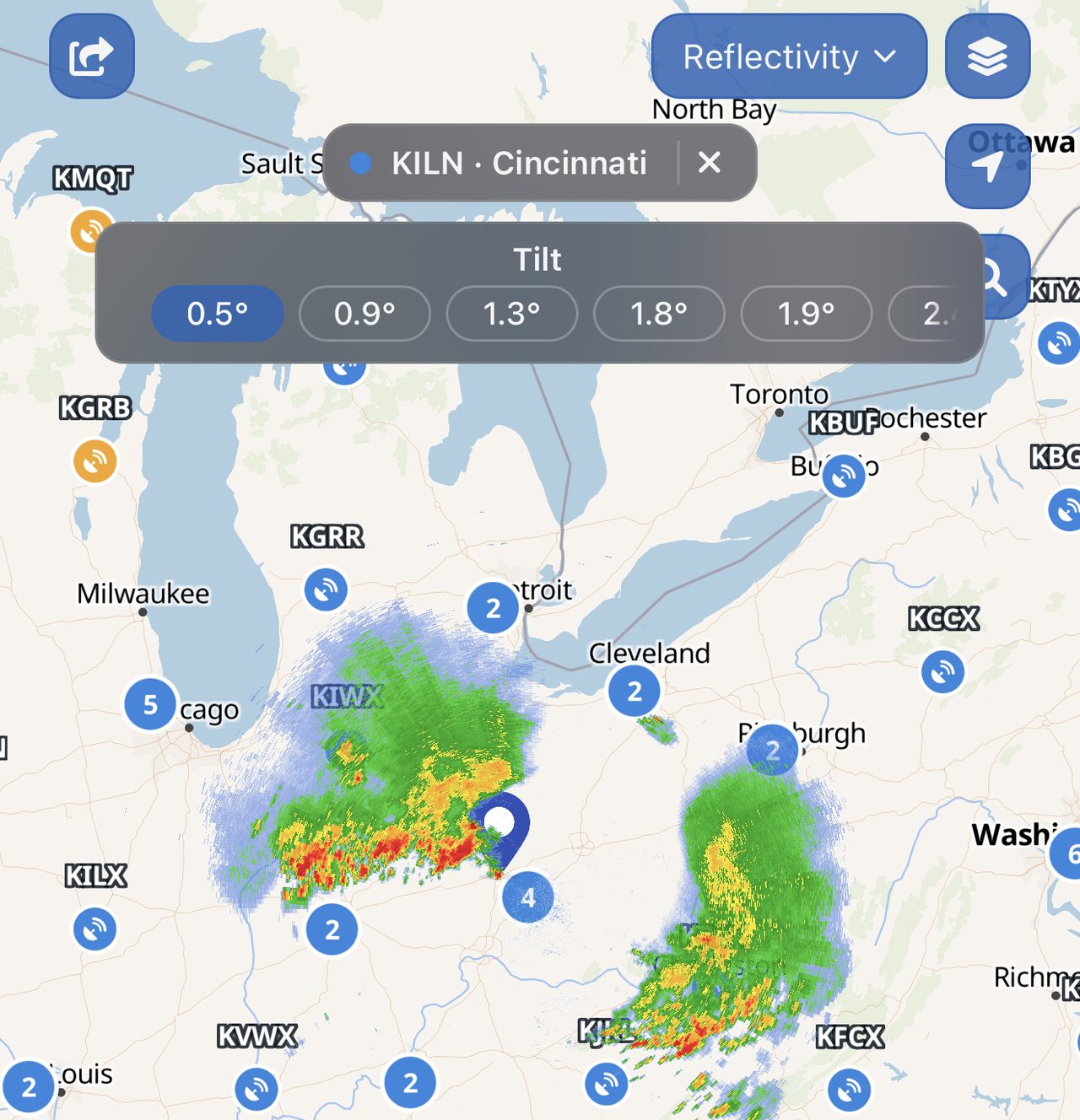
- Tap a station to load its latest volume and take over the radar view.
- Use the product dropdown, tilt strip, and timeline to explore and animate recent sweeps.
Stations update continuously. WeatherScope polls for new volumes so fresh sweeps stream in every few minutes while you watch. Your selected site, product, and tilt survive app restarts and map style changes, so the radar you set up is the radar you come back to.
See Single-Site Radar in Action
Single-Site Radar in WeatherScope lets you move beyond the national mosaic and inspect storms at the station level. Below are a few examples of the feature in action, including station selection, product controls, and high-resolution radar detail.
Free to try, deeper with Premium
Every WeatherScope user can view Reflectivity at the lowest tilt on any station for free. WeatherScope Premium unlocks the full product suite — velocity, dual-pol products, and every elevation tilt — for complete storm interrogation.
Frequently asked questions
What is single-site radar?
Single-site radar, also called single-station radar, is imagery from one individual radar station rather than a blended multi-station mosaic. It offers higher detail, more products like velocity, and multiple elevation angles.
Can I see storm rotation in WeatherScope?
Yes. Select a station near the storm and switch to Radial Velocity. Rotation appears as tightly paired inbound and outbound colors. WeatherScope is not a substitute for official warnings, so always follow guidance from your local weather service.
How fresh is the data?
WeatherScope checks each active station for new volumes on a rolling basis, so new sweeps typically appear within minutes of the radar completing them.
Does single-site radar replace the radar mosaic?
No. The national mosaic is still there for the big picture. Single-site radar is an additional layer you activate when you want station-level detail. Deactivate the site and your previous radar view is restored as it was.
Ready to look inside the storm?
Update to WeatherScope 3.12 on the App Store or Google Play and enable Single-Site Radar from the map layers picker.
If you're also planning a sky-watching trip this week, see our guides to the August 12, 2026 total solar eclipse and the 2026 Perseid meteor shower for ways to use WeatherScope's forecast and live-sky tools before you head out.